Tutorials using Cond. Fill (Number)
One number matched against a list of values, each with its own fill colour — the PLC state-word case.
What Cond. Fill (Number) does
One number, matched against a list of values, each with its own colour. This is the shape a PLC state word takes: a single integer where 0 is stopped, 1 is starting, 2 is running, 3 is faulted.
Rows are compared for equality, not for range. 2.5 does not match the row for 2, and a scaled analog value falls through every row you write. That makes it exactly right for a state number and wrong for a measurement — a measurement wants limits, and limits belong in the alarm logic rather than in a drawing.
Give the fallback a colour that appears nowhere else. State lists grow, and the day somebody adds state 7 to the block you want the graphic to say “I do not know this” rather than to quietly show the same grey as stopped.
One parameter drives the whole thing, which is why this scales better than a stack of booleans as the number of states rises.
Worked examples
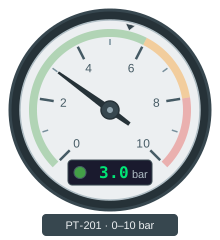
Point a gauge needle at a process value
A round gauge reads at a glance in a way a number never does — you see the needle sitting in the green without reading anything.
Rotation · Cond. Fill (Number) · Text Content
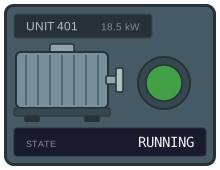
Show machine states from a PLC status word
A machine that publishes its state as one integer — 0 stopped, 1 running, 2 fault, 3 maintenance — should need one binding to display, not one object per state.
Cond. Fill (Number) · Text Content · Visibility (Number)