Tutorials using Cond. Fill (Boolean)
One boolean, two fixed colours — the simplest way to colour a shape from a bit.
What Cond. Fill (Boolean) does
One bit, two colours. Select the element, name the boolean parameter, choose the colour for true and the colour for false. There is nothing else to configure and nothing else to get wrong.
Use it where the fact really is binary and the graphic is entitled to own the rule: a lamp that is lit or not, a hand valve that is open or shut, a motor that is running or stopped. If a third state exists — faulted, travelling, not commissioned — this is the wrong binding, and adding a second one to the same element to cover it gives you two rules that can both be true at once.
Either colour can be fixed or come from a parameter. Fixing both is the fastest thing to build; making them parameters is what lets one widget follow a site’s colour standard instead of imposing yours.
As with every fill binding, the element’s design-time fill is removed when you add it, and putting it on a group clears the fill from the shapes inside.
Worked examples
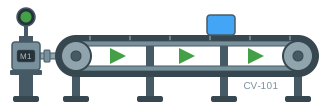
Show a conveyor running forwards or in reverse
A transport that runs both ways has to say which way it is going, and the usual answer — draw the arrows twice and hide one — is one more thing to keep in step.
Flip Horizontal · Cond. Fill (Boolean) · Translation X
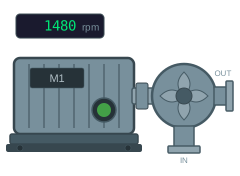
Show a motor as running, stopped or faulted
Two bits and a speed value are all a motor symbol needs.
Cond. Fill (Boolean) · Visibility (Boolean) · Text Content