Tutorials using Translation X
Moves an element sideways by a number, in the units the drawing is in — travel, carriages, growing bars.
What Translation X does
Move an element sideways by a number, in the units the drawing is in.
Not pixels and not a percentage. If the graphic is drawn in a 400-wide coordinate space, a value of 40 moves the element a tenth of the way across it, whatever size the widget ends up on screen. So scale the process value to the drawing where the tag is scaled, and pick the range by looking at the artwork.
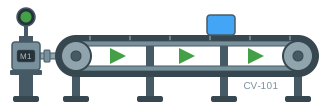
The obvious use is something that travels — a shuttle, a carriage, a product on a conveyor. The less obvious one is a bar or a level that grows from a fixed edge, where moving a shape behind a window is often simpler than resizing it.
The same transform note as rotation: rotation, translation and flip all write the one transform, so an element takes one of them and the next replaces it. If a symbol has to both travel and turn, put them on different elements — a group that moves, holding a shape that rotates.