Tutorials using Flip Horizontal
Mirrors an element left-to-right on a boolean — one bit turns a direction arrow around.
What Flip Horizontal does
Mirror an element left-to-right when a bit is true, about its own centre.
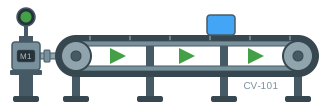
It is the direction binding: one boolean turns a conveyor’s arrows, a transfer car’s nose or a flow indicator around, with no second copy of the artwork to keep in step with the first.
The thing to get right is that it is a mirror, not a direction. It reverses whatever you point it at, so what the true state looks like depends entirely on which way the symbol was drawn. Draw the arrows pointing forward — the direction that reads as normal — and let the flip produce reverse. Draw them backwards by accident and every screen using the widget runs the wrong way, which nobody notices until commissioning.
The corollary: a symmetric shape shows nothing at all when it flips. If a reader cannot tell the two states apart, the geometry is symmetric and the binding is working perfectly. And as with rotation and translation, this drives the element’s one transform, so it is one of the three rather than one alongside them.