Tutorials using Custom Attribute
Drives any attribute you name from an expression — the binding for geometry and for arithmetic.
What Custom Attribute does
Name an attribute, write an expression, and that attribute follows it. This is the binding for everything the fixed list does not cover, most often geometry: width, height, x, y, r, points.
An expression can read parameters and do arithmetic, which is what the other bindings deliberately do not. A bar that grows with a value is a width expression; a level that rises is a y expression. A bar drawn 280 units wide over a 0–100 % range gives 2.8 units per percent, and that factor comes from the artwork rather than from a formula anyone has to remember.
So draw the shape at full travel before working the factor out. Full-scale geometry is what the arithmetic derives from, and a bar drawn at its maximum lets you read the numbers straight off the element instead of measuring them.
Nothing checks that the attribute suits the element — r on a rectangle is accepted and does nothing — so simulate both ends of the range and watch it move before you trust it.
Worked examples
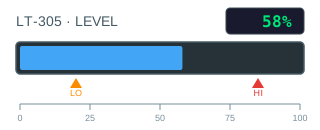
Build a bar graph that recolours at its limits
A bar is the cheapest way to make a number readable across a room, and it costs two bindings: one for how long it is, one for what colour.
Custom Attribute · Cond. Fill (Multi-Bool) · Text Content
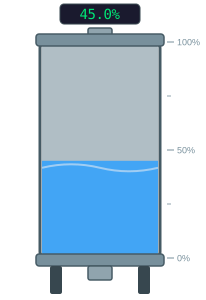
Drive a tank level from an analog value
A level in percent is one number, and the graphic that shows it should be one binding.
Custom Attribute · Cond. Fill (Multi-Bool) · Text Content