Tutorials mit Stroke Opacity
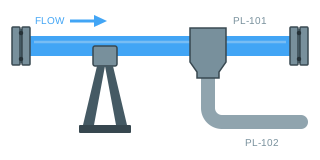
Blendet die Kontur eines Elements über einen Prozentwert aus — ein abgesperrter Abzweig, der auf der Zeichnung bleibt.
Was Stroke Opacity macht
Die Kontur eines Elements über eine Zahl ausblassen, angegeben in Prozent: 100 ist voll gezeichnet, 0 ist unsichtbar.
Sein natürlicher Ort ist die Verrohrung und alles andere, was aus Linien besteht. Ein abgesperrter Abzweig, eine außer Betrieb genommene Sammelleitung, ein nicht angewählter Weg — die Kontur auszublassen sagt, dass die Linie existiert und gerade nichts führt, und das kann Ausblenden nicht sagen. Ein verschwindendes Rohr macht die Zeichnung falsch; das Rohr hängt ja weiter an der Wand.
Etwa 20 ist meist der brauchbare Wert für „vorhanden, nicht in Betrieb“. Niedrig genug, um beim ersten Blick nicht aufzufallen, hoch genug, dass es findet, wer danach sucht. Probieren Sie null einmal im Simulieren aus, damit Sie wissen, was es kostet: Die Linie ist dann ganz weg, und das ist selten gemeint.
Es ist der Zwilling von Fill Opacity, und beide sind unabhängig — eine Form kann also eine kräftige Kontur behalten, während ihre Innenfläche ausblasst, oder umgekehrt.