Tutorials mit Rotation
Dreht ein Element um einen Winkel in Grad, um einen Mittelpunkt, den der Editor aus dem Element selbst ableitet.
Was Rotation macht
Ein Element um eine Gradzahl drehen, um einen Mittelpunkt, den der Editor beim Hinzufügen des Bindings aus dem Element ermittelt.
Es ist das Binding hinter jedem Zeiger, jeder Scheibe, jeder Klappe und jedem Schwenkarm im Bild. Der Parameter ist ein Winkel, die Rechnung vom Prozesswert dorthin gehört also dahin, wo der Tag skaliert wird: ein 0–16-bar-Manometer über 240° Skalenwinkel sind 15 Grad je bar, und einmal vorgelagert gerechnet bleiben alle Grafiken zu diesem Tag einig.
Prüfen Sie den Mittelpunkt, bevor Sie ihm trauen. Er stammt aus der Ausdehnung des Elements, liegt bei einer symmetrischen Form richtig und kann bei einem L-förmigen Pfad oder einer Form mit langem Ausläufer unglücklich sitzen. Simulieren Sie beide Enden des Wegs und schauen Sie zu, worum es sich dreht.
Zwei weitere Punkte, beide vorab wichtig: Ein transform-origin in der Zeichnung wird ignoriert, entfernen Sie es also, statt daran zu justieren. Und Drehung, Verschiebung und Spiegelung steuern dieselbe Transformation — ein Element trägt also eines der drei, ein zweites ersetzt das erste.
Beispiele
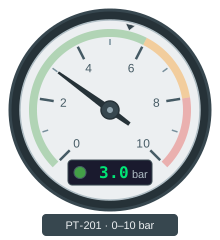
Einen Manometerzeiger auf einen Prozesswert ausrichten
Ein Rundinstrument liest sich auf einen Blick, wie es eine Zahl nie tut — man sieht den Zeiger im grünen Bereich stehen, ohne etwas zu lesen.
Rotation · Cond. Fill (Number) · Text Content
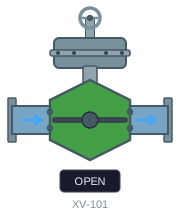
Ein Ventil als offen, geschlossen, fahrend oder gestört anzeigen
Ein Ventil im Bild muss eine Frage auf einen Blick beantworten: Steht es dort, wo es stehen soll?
Cond. Fill (Multi-Bool) · Rotation · Text Content